
Outline 4D (formerly known as Storyview 2.0)
Started by Dr Andus
on 11/10/2012
Dr Andus
11/10/2012 4:02 pm
I see that Outline 4D is on sale at USD75.00 on the Write Bros website:
http://www.screenplay.com/p-77-outline-4d.aspx
They must have picked up on the fact that some online retailers were undercutting them for some time now.
I am still learning O4D but for now it's my favourite single-pane outliner with inline notes. I use it to add flesh in the form of inline notes onto a pre-existing Bonsai outline, and afterwards I export it into Scrivener for final writing up.
The interface does show its age in some respects, but if you can get over that fact, there are some truly unique features under the hood, such as the ability to view items at a particular hierarchy level only (e.g. only level 4 and exclude all the other levels, from 1 to 3, and 5-6), not to mention the Timeline View, which is a very special kind of a corkboard.
I'm still working through the manual to master the Timeline View, but I can already see that it can have uses beyond just simply viewing your outline in another view. E.g. I could see it work as a qualitative analysis tool, by starting with empirical examples with "index cards" at level 5 of an outline, and then gradually develop the contents of the subsequent higher levels of the text (which are larger cards that enclose the cards at the lower level) by extracting and abstracting content from the lower levels. It's basically a pyramidal structure, with abstraction rising through the ranks.
Finally, the third main feature is the plotting tool, the "Tracking Feature," which allows you to track anything (story lines, characters, objects, concepts) across the index cards in the Timeline View. It can also be enabled to do that automatically, by setting a keyword.
http://www.screenplay.com/p-77-outline-4d.aspx
They must have picked up on the fact that some online retailers were undercutting them for some time now.
I am still learning O4D but for now it's my favourite single-pane outliner with inline notes. I use it to add flesh in the form of inline notes onto a pre-existing Bonsai outline, and afterwards I export it into Scrivener for final writing up.
The interface does show its age in some respects, but if you can get over that fact, there are some truly unique features under the hood, such as the ability to view items at a particular hierarchy level only (e.g. only level 4 and exclude all the other levels, from 1 to 3, and 5-6), not to mention the Timeline View, which is a very special kind of a corkboard.
I'm still working through the manual to master the Timeline View, but I can already see that it can have uses beyond just simply viewing your outline in another view. E.g. I could see it work as a qualitative analysis tool, by starting with empirical examples with "index cards" at level 5 of an outline, and then gradually develop the contents of the subsequent higher levels of the text (which are larger cards that enclose the cards at the lower level) by extracting and abstracting content from the lower levels. It's basically a pyramidal structure, with abstraction rising through the ranks.
Finally, the third main feature is the plotting tool, the "Tracking Feature," which allows you to track anything (story lines, characters, objects, concepts) across the index cards in the Timeline View. It can also be enabled to do that automatically, by setting a keyword.
Dr Andus
11/10/2012 4:25 pm
Dr Andus wrote:
Actually the download-only price is USD65.00.
I see that Outline 4D is on sale at USD75.00 on the Write Bros
website:
http://www.screenplay.com/p-77-outline-4d.aspx
Actually the download-only price is USD65.00.
MenAgerie
11/22/2012 8:44 pm
Dr Andus wrote:
Can people identify any other outliners that have this feature?
Cheers
Jeff
my favourite single-pane
outliner with inline notes. I use it to add flesh in the form of inline
notes onto a pre-existing Bonsai outline,
Can people identify any other outliners that have this feature?
Cheers
Jeff
Dr Andus
11/22/2012 10:07 pm
For Windows I'm only aware of the following single-pane outliners with inline notes:
- Maxthink
- LexisNexis Notemap 2
- Inspiration
- UV Outliner
- Outline 4D
Out of these only Inspiration and UV Outliner seem to be actively developed.
I tried them all and settled on O4D. However I had to turn off UAC in Win7 to be able to run it properly. But otherwise I'm happy as Larry.
Notemap has been reported to occasionally lose content with large notes. Otherwise I would have selected it, as it looks very good for this sort of outlining.
- Maxthink
- LexisNexis Notemap 2
- Inspiration
- UV Outliner
- Outline 4D
Out of these only Inspiration and UV Outliner seem to be actively developed.
I tried them all and settled on O4D. However I had to turn off UAC in Win7 to be able to run it properly. But otherwise I'm happy as Larry.
Notemap has been reported to occasionally lose content with large notes. Otherwise I would have selected it, as it looks very good for this sort of outlining.
Dr Andus
11/22/2012 10:15 pm
P.S. There is nothing particularly wrong with Inspiration or UV Outliner, I just find them too fiddly to use after having gotten used to the ease of outlining in Bonsai.
As for Maxthink, it looks very interesting, but O4D fits my needs better, e.g. one can use different colours and fonts for different levels of the hierarchy (and then there are the timeview and plot tracking features, though for now I'm only using it as an inline outliner).
As for Maxthink, it looks very interesting, but O4D fits my needs better, e.g. one can use different colours and fonts for different levels of the hierarchy (and then there are the timeview and plot tracking features, though for now I'm only using it as an inline outliner).
Dr Andus
11/24/2012 12:05 am
MenAgerie wrote:
Glad you liked it. O4D continues to be one of my favourites.
In case you're still interested, you can download it from here, after filling out their form (with any old nonsense:)
http://www.casesoft.com/notemap/download.asp
I never bothered phoning them up to find out how much it costs. However, it's a very good-looking software. I hope somebody creates something similar one day...
I succumbed to O4D - I found the process of getting my thoughts down
really smooth - it all just clicked and I turned a pile of shapeless
notes into a lecture in an hour.
Glad you liked it. O4D continues to be one of my favourites.
I had a go at them all [except Notemap, I could not
even find how to download it on their website - very unwelcoming place].
In case you're still interested, you can download it from here, after filling out their form (with any old nonsense:)
http://www.casesoft.com/notemap/download.asp
I never bothered phoning them up to find out how much it costs. However, it's a very good-looking software. I hope somebody creates something similar one day...
Dr Andus
12/27/2012 5:21 pm
Dr Andus wrote:
And now the price has jumped back up to USD89.95. Hm, interesting pricing strategy... It looks like they're fairly confident in their ageing product then. I thought the price started on a downward slope, but I was wrong.
BTW, it's also available for USD79.00 at http://bit.ly/TrRxlJ But that's still quite pricey for a piece of software that hasn't been updated for many years. Having said that, I do love it and it is a very unique software.
>I see that Outline 4D is on sale at USD75.00 on the Write Bros
>website: http://www.screenplay.com/p-77-outline-4d.aspx
Actually the download-only price is USD65.00.
And now the price has jumped back up to USD89.95. Hm, interesting pricing strategy... It looks like they're fairly confident in their ageing product then. I thought the price started on a downward slope, but I was wrong.
BTW, it's also available for USD79.00 at http://bit.ly/TrRxlJ But that's still quite pricey for a piece of software that hasn't been updated for many years. Having said that, I do love it and it is a very unique software.
Listerene
12/28/2012 5:11 pm
I finally got tired of their lack of updates and the UAC thing -- having to compromise security because they're too lazy to update their now hugely overpriced and archaic product was more than upsetting to me -- so I switched to UV. I was always a big fan of Grandview and UV is the closest I've found. While there are some features UV misses, it makes up for them with the added security and ease of use PLUS there are various ways to simulate 4D's features in UV.
All in all, I'll take a freeware program that is continually updated to an overpriced relic published by a slothful company disrespectful of their users; any day. I hope others will too, as an encouragement to said slothful, disrespectful company to be less so.
All in all, I'll take a freeware program that is continually updated to an overpriced relic published by a slothful company disrespectful of their users; any day. I hope others will too, as an encouragement to said slothful, disrespectful company to be less so.
Dr Andus
12/28/2012 6:06 pm
Listerene wrote:
I generally agree with the factual points you make, except I don't share the emotions, partly because I didn't pay the full price, partly because I just accept it as a fact that software age and get abandoned (on the plus side no more future costs :), and partly because I do enjoy using O4D for some of its unique features.
Which features are you referring to and how do you simulate them?
At the moment I'm using O4D for the following features (besides it being a single-pane outliner with inline notes):
- ability to have individual formatting according to hierarchy level both for text and background colour;
- ability to hold long inline notes;
- ability to format (especially highlight in yellow) text in inline notes;
- ability to toggle between 1) items & notes view, 2) items (titles) only, 3) notes only or 4) create custom views for each item;
- ability to use Level Selector to view selected level(s) of the hierarchy;
- ability to select individual hierarchy levels to export as RTF.
At the moment I don't use the Timeline view and plotline tracking features but those are pretty unique as well and I hope to use them in the future.
I finally got tired of their lack of updates and the UAC thing -- having
to compromise security because they're too lazy to update their now
hugely overpriced and archaic product was more than upsetting to me --
so I switched to UV. I was always a big fan of Grandview and UV is the
closest I've found.
All in all, I'll take a freeware program that is continually updated to
an overpriced relic published by a slothful company disrespectful of
their users; any day. I hope others will too, as an encouragement to
said slothful, disrespectful company to be less so.
I generally agree with the factual points you make, except I don't share the emotions, partly because I didn't pay the full price, partly because I just accept it as a fact that software age and get abandoned (on the plus side no more future costs :), and partly because I do enjoy using O4D for some of its unique features.
PLUS there are various ways to simulate 4D's features in UV.
Which features are you referring to and how do you simulate them?
At the moment I'm using O4D for the following features (besides it being a single-pane outliner with inline notes):
- ability to have individual formatting according to hierarchy level both for text and background colour;
- ability to hold long inline notes;
- ability to format (especially highlight in yellow) text in inline notes;
- ability to toggle between 1) items & notes view, 2) items (titles) only, 3) notes only or 4) create custom views for each item;
- ability to use Level Selector to view selected level(s) of the hierarchy;
- ability to select individual hierarchy levels to export as RTF.
At the moment I don't use the Timeline view and plotline tracking features but those are pretty unique as well and I hope to use them in the future.
Dr Andus
12/28/2012 6:08 pm
P.S. I forget to mention the "Tile vertically" feature, which allows me to view three O4D outlines side-by-side comfortably on a 22in monitor.
Dr Andus
12/28/2012 6:19 pm
Dr Andus wrote:
Although there is at least one optimistic user at the O4D forum who is expecting a v. 3 release and posted as recently as last month:
http://forums.screenplay.com/viewtopic.php?f=13&t=4283&sid=c7295b809be22567e7d0253dca817c95
I just accept it as a fact that software age and get abandoned
Although there is at least one optimistic user at the O4D forum who is expecting a v. 3 release and posted as recently as last month:
http://forums.screenplay.com/viewtopic.php?f=13&t=4283&sid=c7295b809be22567e7d0253dca817c95
Dr Andus
1/13/2013 1:42 am
A bit more on Outline 4D, on how I use it for writing a draft and reverse outlining, with several screenshots:
http://drandus.wordpress.com/2013/01/13/outline-4d-for-drafting-and-reverse-outlining/
http://drandus.wordpress.com/2013/01/13/outline-4d-for-drafting-and-reverse-outlining/
Alexander Deliyannis
1/13/2013 10:01 am
This is excellent!
Seriously, send this To Write Brothers and ask for an affiliate link, you may have created a new market for them.
Seriously, send this To Write Brothers and ask for an affiliate link, you may have created a new market for them.
Dr Andus
1/13/2013 8:39 pm
Thank you Alexander, glad you like it! BTW, it was you who introduced me to O4D, so doubly thanks for that. Alongside CT, O4D was my other great discovery of 2012.
Dr Andus
1/14/2013 1:22 pm
I've just realised that I still managed to forget another important view (the "Summarize" view that shows the title and the first line of each item). I've added it now to the blog post.
This brings the number of different views you can have of your outline in O4D to 10 (without counting the Timeline View, which is a whole another kettle of fish)...
I don't know of another outliner with that many different views. Which is not to say O4D doesn't have shortcomings. It lacks hoisting, which would be nice to have.
This brings the number of different views you can have of your outline in O4D to 10 (without counting the Timeline View, which is a whole another kettle of fish)...
I don't know of another outliner with that many different views. Which is not to say O4D doesn't have shortcomings. It lacks hoisting, which would be nice to have.
Dr Andus
1/31/2013 12:22 am
Dr Andus wrote:
I still managed to miss yet another (the 11th) crucial view in Outline 4D. Thanks to its MDI, it's possible to display 2 (or more!) versions of the same outline side-by-side, so e.g. if you're working on a very large outline, you can have the top displayed in one, and the bottom in the other (with changes updated to both).
Or you can have a different type of view applied to each window. In this example the left window is in full view, the right window is in "titles only" (skeletal) view. I can't believe I haven't discovered this sooner...
http://drandus.files.wordpress.com/2013/01/outline-4d_dual_view.png
I've just realised that I still managed to forget another important view
(the "Summarize" view that shows the title and the first line of each
item). I've added it now to the blog post.
This brings the number of different views you can have of your outline
in O4D to 10 (without counting the Timeline View, which is a whole
another kettle of fish)...
I don't know of another outliner with that many different views. Which
is not to say O4D doesn't have shortcomings. It lacks hoisting, which
would be nice to have.
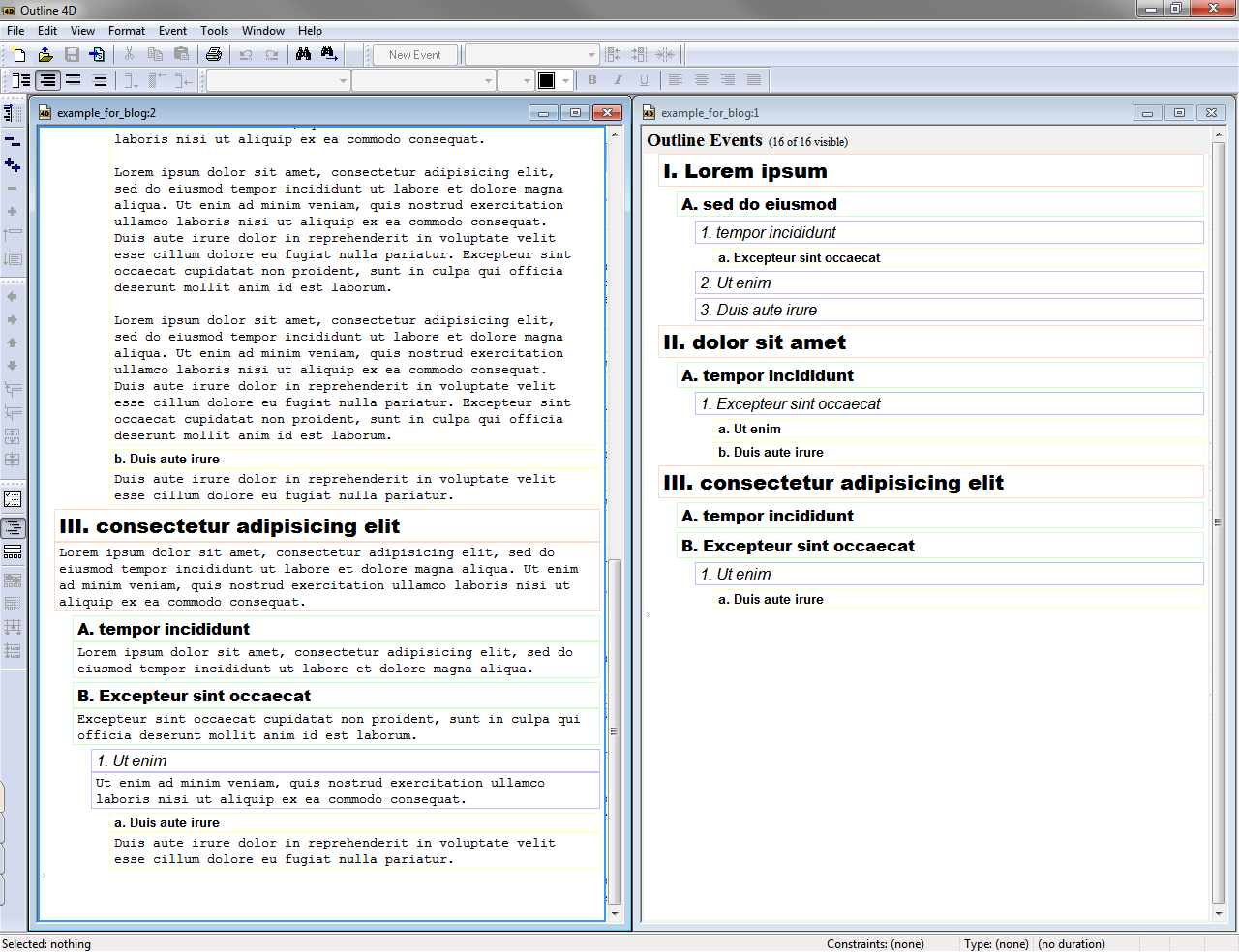
I still managed to miss yet another (the 11th) crucial view in Outline 4D. Thanks to its MDI, it's possible to display 2 (or more!) versions of the same outline side-by-side, so e.g. if you're working on a very large outline, you can have the top displayed in one, and the bottom in the other (with changes updated to both).
Or you can have a different type of view applied to each window. In this example the left window is in full view, the right window is in "titles only" (skeletal) view. I can't believe I haven't discovered this sooner...
http://drandus.files.wordpress.com/2013/01/outline-4d_dual_view.png
Dr Andus
1/31/2013 10:26 am
Dr Andus wrote:
In fact this option does make it similar to BrainStorm's aerial view, except that you have a lot more options in terms of visualisation of outline for both panes.
If you do this with the timeline view in one pane (with "View > Fit to View" on), and outline pane in the other, you could even emulate Grandview's document window combined with a Brainstorm style aerial view:
https://dl.dropbox.com/u/428516/Outline%204D_timeline_with_outline.png
>I don't know of another outliner with that many different views. Which
>is not to say O4D doesn't have shortcomings. It lacks hoisting, which
>would be nice to have.
I still managed to miss yet another (the 11th) crucial view in Outline
4D. Thanks to its MDI, it's possible to display 2 (or more!) versions of
the same outline side-by-side, so e.g. if you're working on a very large
outline, you can have the top displayed in one, and the bottom in the
other (with changes updated to both).
Or you can have a different type of view applied to each window. In this
example the left window is in full view, the right window is in "titles
only" (skeletal) view. I can't believe I haven't discovered this
sooner...
http://drandus.files.wordpress.com/2013/01/outline-4d_dual_view.png
In fact this option does make it similar to BrainStorm's aerial view, except that you have a lot more options in terms of visualisation of outline for both panes.
If you do this with the timeline view in one pane (with "View > Fit to View" on), and outline pane in the other, you could even emulate Grandview's document window combined with a Brainstorm style aerial view:
https://dl.dropbox.com/u/428516/Outline%204D_timeline_with_outline.png

Dr Andus
1/31/2013 10:59 pm
Dr Andus wrote:
And you can even construct a 3-pane outliner out of O4D, using this method. The left pane is “Titles only” view; the middle pane is “Summary” view with first line of content showing, and the right pane is in “Timeline view” with “Fit to view (Ctrl+3)” on, only showing one item in focus.
http://drandus.files.wordpress.com/2013/01/outline_4d_three_pane_outliner.png
Okay, I'll promise to stop now. It's just that I've been really impressed with O4D as a writing-focused outlining tool. It was one of the first software for which I've read the manual cover-to-cover, yet I'm still discovering new (and useful) visualisations.
If you do this with the timeline view in one pane (with "View > Fit to
View" on), and outline pane in the other, you could even emulate
Grandview's document window combined with a Brainstorm style aerial
view:
https://dl.dropbox.com/u/428516/Outline%204D_timeline_with_outline.png
And you can even construct a 3-pane outliner out of O4D, using this method. The left pane is “Titles only” view; the middle pane is “Summary” view with first line of content showing, and the right pane is in “Timeline view” with “Fit to view (Ctrl+3)” on, only showing one item in focus.
http://drandus.files.wordpress.com/2013/01/outline_4d_three_pane_outliner.png

Okay, I'll promise to stop now. It's just that I've been really impressed with O4D as a writing-focused outlining tool. It was one of the first software for which I've read the manual cover-to-cover, yet I'm still discovering new (and useful) visualisations.
Dr Andus
3/27/2013 5:00 pm
Dr Andus wrote:
There seems to be a promotion on for USD59.00 this time, if anyone's interested.
Dr Andus wrote:
>I see that Outline 4D is on sale at USD75.00 on the Write Bros
>website:
>http://www.screenplay.com/p-77-outline-4d.aspx
Actually the download-only price is USD65.00.
There seems to be a promotion on for USD59.00 this time, if anyone's interested.
Dr Andus
3/30/2013 11:42 am
Turns out the sale is through Sunday 31 March and also applies to some other Write Bros software:
Movie Magic® Screenwriter 6: $159 (save $90)
Dramatica® Story Expert: $99 (save $100)
Dramatica® Pro: $99 (save $50)
Outline 4D™: $59 (save $40)
Movie Magic® Screenwriter 6: $159 (save $90)
Dramatica® Story Expert: $99 (save $100)
Dramatica® Pro: $99 (save $50)
Outline 4D™: $59 (save $40)
Dr Andus
5/29/2013 11:05 pm
Although I don't use this aspect of Outline 4D at all (I only use it as a straightforward single-pane outliner with inline notes), this review gives an idea of how the Timeline View can be used for script-writing. It has been discussed on this forum that in practice it doesn't work all that well, but it's an interesting feature nonetheless:
http://www.scriptmag.com/features/screenwriting-product-review-outlining-software
http://www.scriptmag.com/features/screenwriting-product-review-outlining-software
Dr Andus
9/2/2014 4:10 pm
I just noticed that O4D is on sale right now for USD49.00. That's the lowest I've seen, in case someone has been waiting for a promotion. Otherwise it's an ageing bit of software, at the regular price of USD99.95 I would consider it quite overpriced. Nevertheless, it's one of the few single-pane outliners with inline notes out there.
drm vorlock
9/3/2014 9:55 pm
I want to create a timeline/eventline to help plot a novel which is not told in chronological order. I'm looking to create a purely chronological eventline, as well as an a-chronological 'throughline' with the scenes in the order in which the story unfolds, correlated with parallel eventlines showing 'who-knows-what-when' for several characters. I may end up using paper and markers, but I'd like to find some software which would allow me to change things around freely without facing the tedium of constant redrawing.
The event tracker of Outliner-4D looks like it might do I want, but I'm put off by the software's premium price combined with its apparent abandonment and lack of mantenace updates. Also a 5 day trial for O4D seems unecessisarily parsimonious -- certainly not much time to get comfortable with the ins and outs of the program or to determine if it is going to crash frequently on my win7/64 and/or be a resourse hog.
Unfortunately, searching "event tracking software" (for novelists) yields slim pickings, so I'm asking for any suggestions before I download the O4D trial.
Dr Andus
9/4/2014 8:34 am
drm vorlock wrote:
Most of your concerns are justified. It can crash, but it does it rarely enough that it doesn't bother me (on Win7/64), and I've never lost any data. I don't think it's a resource hog, in fact it seems fairly light. I don't think very highly of its horizontal outliner (Gingko app is much better for that), but the vertical outliner is one of the most fully featured on the market for single-pane outliners with inline notes, which is why I still use it.
The "event tracking feature" does work, but whether it works the way you want to use it, you can only find out if you download it and try it yourself. As for the premium price, I've never seen it for less than the current promotion.
The first software that came to my mind was Storybook, however I don't know in what shape it is currently. You can search this forum for discussions on it (e.g. http://www.outlinersoftware.com/topics/viewt/5144/ The latest version is here:
http://sourceforge.net/projects/ostorybook/
The event tracker of Outliner-4D looks like it might do I want, but I'm
put off by the software's premium price combined with its apparent
abandonment and lack of mantenace updates. Also a 5 day trial for O4D
seems unecessisarily parsimonious -- certainly not much time to get
comfortable with the ins and outs of the program or to determine if it
is going to crash frequently on my win7/64 and/or be a resourse hog.
Unfortunately, searching "event tracking software" (for novelists)
yields slim pickings, so I'm asking for any suggestions before I
download the O4D trial.
Most of your concerns are justified. It can crash, but it does it rarely enough that it doesn't bother me (on Win7/64), and I've never lost any data. I don't think it's a resource hog, in fact it seems fairly light. I don't think very highly of its horizontal outliner (Gingko app is much better for that), but the vertical outliner is one of the most fully featured on the market for single-pane outliners with inline notes, which is why I still use it.
The "event tracking feature" does work, but whether it works the way you want to use it, you can only find out if you download it and try it yourself. As for the premium price, I've never seen it for less than the current promotion.
I want to create a timeline/eventline to help plot a novel which is not
told in chronological order. I'm looking to create a purely
chronological eventline, as well as an a-chronological 'throughline'
with the scenes in the order in which the story unfolds, correlated with
parallel eventlines showing 'who-knows-what-when' for several
characters. I may end up using paper and markers, but I'd like to find
some software which would allow me to change things around freely
without facing the tedium of constant redrawing.
The first software that came to my mind was Storybook, however I don't know in what shape it is currently. You can search this forum for discussions on it (e.g. http://www.outlinersoftware.com/topics/viewt/5144/ The latest version is here:
http://sourceforge.net/projects/ostorybook/
Hugh
9/4/2014 10:09 am
drm vorlock wrote:
I want to create a timeline/eventline to help plot a novel which is not
told in chronological order. I'm looking to create a purely
chronological eventline, as well as an a-chronological 'throughline'
with the scenes in the order in which the story unfolds, correlated with
parallel eventlines showing 'who-knows-what-when' for several
characters. I may end up using paper and markers, but I'd like to find
some software which would allow me to change things around freely
without facing the tedium of constant redrawing.
The event tracker of Outliner-4D looks like it might do I want, but I'm
put off by the software's premium price combined with its apparent
abandonment and lack of mantenace updates. Also a 5 day trial for O4D
seems unecessisarily parsimonious -- certainly not much time to get
comfortable with the ins and outs of the program or to determine if it
is going to crash frequently on my win7/64 and/or be a resourse hog.
Unfortunately, searching "event tracking software" (for novelists)
yields slim pickings, so I'm asking for any suggestions before I
download the O4D trial.
Have you tried Aeon Timeline (the only time-liner that I know of that's designed expressly for writers)? http://www.scribblecode.com
1
2